One system for every machine in your shop
Most fabricators don't buy all their machines from one manufacturer, and running a different programming system for each brand means separate training, separate part libraries and programs that can't be moved between machines when one goes down. JETCAM Expert drives machines from many manufacturers, including Amada, Trumpf, Bystronic, LVD, Salvagnini, Prima, Mazak, Mitsubishi, Murata Wiedemann, Finn-Power, Euromac and Durma, so a part tooled once can be nested for whichever machine has capacity.

Most new machines arrive with programming software of their own, and if you run one machine on straightforward work it may well be all you need. The problems tend to start when you add a second brand, move to fibre laser cutting, or need nests to come from your MRP system rather than a programmer.
I-Cherng Refrigeration in Taiwan, a JETCAM user since 1995, bought an Amada FLC 4020AJ fibre laser in 2018 and found the bundled software wasn't suited to fibre cutting. Senior Engineer Ian Yo told us they 'could easily spend over 4 hours to modify the NC code in order to get it to run on the machine.' After adding a JETCAM postprocessor with JET-Cut and JET-Optimizer, programming time fell by 80%, machine run time fell by 13.2% on the same nests, and material utilisation improved by between 5% and 30% through automatic common cutting. The upgrade paid for itself in under four months.

Nesting engines for every type of work
Different work needs different nesting. Instant Rectangular Nesting handles simple rectangular parts in a moment, with an included time-based high-performance rectangular engine that keeps improving the result for as long as you allow it. Free Form Automatic Nesting (FFAN) produces true shape nests almost instantly for everyday work. For high volumes or expensive material, Ultra Performance Nesting (UPN) spends longer searching for a better result, because on stainless or aluminium an extra 1-2% yield is worth more than a few minutes of computer time. Multi-sheet nesting considers several sheet sizes (including remnants) together rather than filling one sheet at a time, and remnant management lets you store offcuts and nest on them later instead of sending them for scrap.
High Performance nesting is an additional upgrade rather than part of every version, so the benchmark below is a sensible way to see whether it pays for itself on your parts before you buy it.


Punching: Automatic tooling and turret management
JETCAM Expert selects tools automatically from your turret and tool library, and tool teach mode lets you capture how your programmers prefer to tool particular features so the software repeats it.
Regularly spaced single hits are converted into a line of hits to cut machine time, and multi-tool holder logic loads only the holders a job actually uses into the turret loading screen, NC code and reports. Automatic hazard avoidance keeps the punch head clear of clamps and already-punched areas.

Automation, from one click to lights-out
Single Component Automatic Processing (SCAP) imports and tools a part in one step, and Parametric Programming creates whole families of parts from a few dimensions.
For more automation, JETCAM Orders Controller queues CAD files and orders for automatic import and nesting, and Remote Control Processing (RCP) lets your MRP or ERP system send work to JETCAM Expert and receive the results back.
CrossTrack for sheet metal adds material tracking, nest scheduling and traceability, along with fully automated production lines.
What would a 1% material saving be worth to you?

Proven over 40 years


Frequently Asked Questions
JETCAM Expert drives turret punches, lasers, punch/laser combination machines, plasma, oxyfuel, waterjet and routers from around 180 machine manufacturers, including machines with loading and unloading automation. If your machine isn't supported yet, a postprocessor can usually be written quickly.
Yes. Expert Premium includes the option to add unlimited postprocessors, so parts can be tooled once - one 'layer per machine' - and nested for any of your machines, whatever the brand or cutting technology.
If you run one machine on straightforward work, the bundled software may be enough, but you are then tied to that manufacturer in the future, as all of your parts will be in their proprietary format.
JETCAM Expert earns its place when you run several machine brands, need features such as fly cutting on a fibre laser, or want nests generated automatically from your MRP system. I-Cherng Refrigeration - already a JETCAM user - cut programming time by 80% after moving its Amada fibre laser from the bundled software to JETCAM.
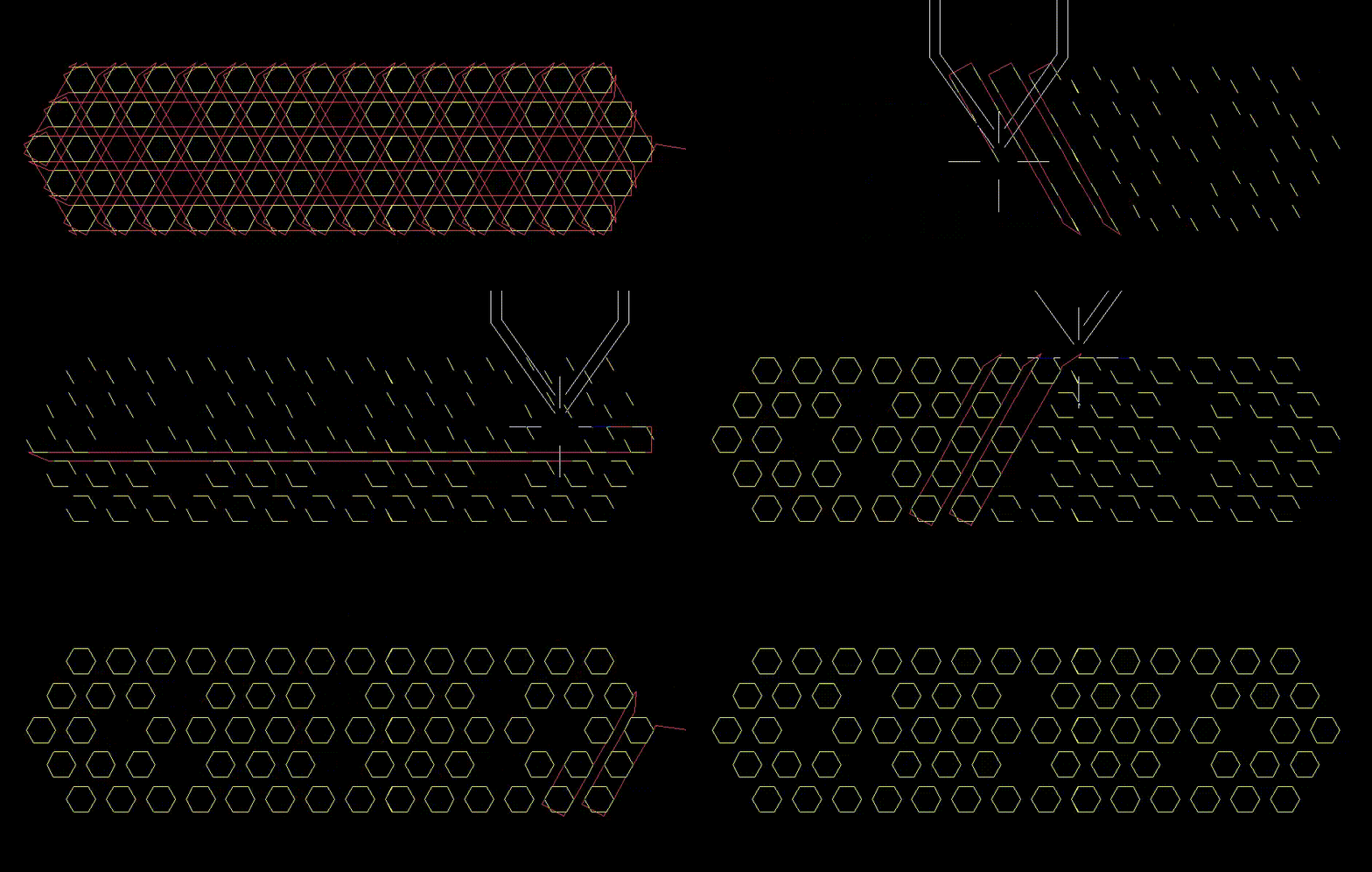
Fly cutting, also called grid cutting, cuts arrays of holes in continuous passes rather than piercing and moving to each one separately. JETCAM's JET-Cut does this automatically and has reduced cut times on complex parts by 25-50% in tests.
Expert Lite is the low-cost entry point. Expert 1 adds automation such as Single Component Automatic Processing and Tool Teach. Expert Premium adds unlimited postprocessors, complex machine support, Parametric Programming and multiple nesting engines. Premium Connected Automation adds complete remote control from MRP and ERP systems. You can purchase any version and scale up in the future, only paying the difference in price between versions.
Yes. Remote Control Processing (RCP) lets external systems send tasks such as creating tooled components or nesting orders to JETCAM Expert and receive results, JETCAM Orders Controller automates CAD import and ordering using CSV files, and CrossTrack adds two-way web services integration with virtually any ERP or MES.
No. All JETCAM products can run on secure, air-gapped networks with no internet connection.
Use the free nesting savings calculator for a quick estimate, then request a free nesting benchmark using your own parts and constraints. That gives you an actual percentage to apply to your annual material spend. A demo will give you an idea of the potential time staff could save through JETCAM's intelligent automation.